From AI-assisted floor plans to advanced LiDAR measurement technology, discover how today's floor plan solutions differ—and why those differences matter.
When buyers explore a property online, professional photography is usually what first captures their attention. But photographs alone don't always tell the complete story.
How do the rooms connect? Where are the bedrooms located? How large is the living area? And how does the overall layout work?
That's where floor plans become an important part of real estate marketing.
Today's floor plan technology has advanced considerably. From smartphone-based scanning and artificial intelligence to sophisticated laser measurement systems, there are more ways than ever to document and showcase a property's layout.
At HomeTourVision, we offer several floor plan and virtual tour solutions, including CubiCasa, iGUIDE, and Zillow 3D Home.
Although these technologies may appear similar at first glance, the methods used to create them, the information they provide, and their intended purposes can be quite different.
Understanding those differences helps real estate professionals make informed decisions about the tools they use to market their listings.
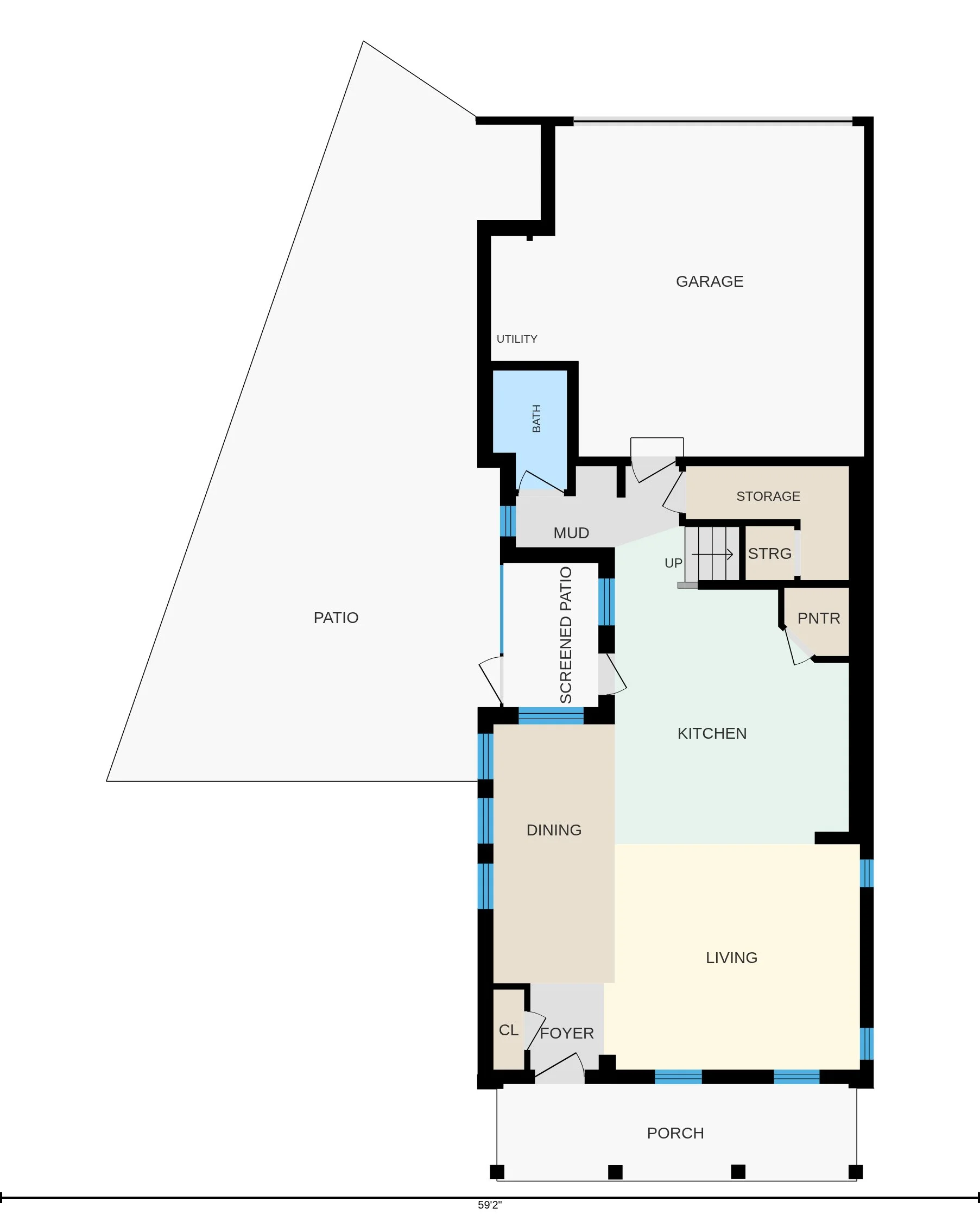
CubiCasa
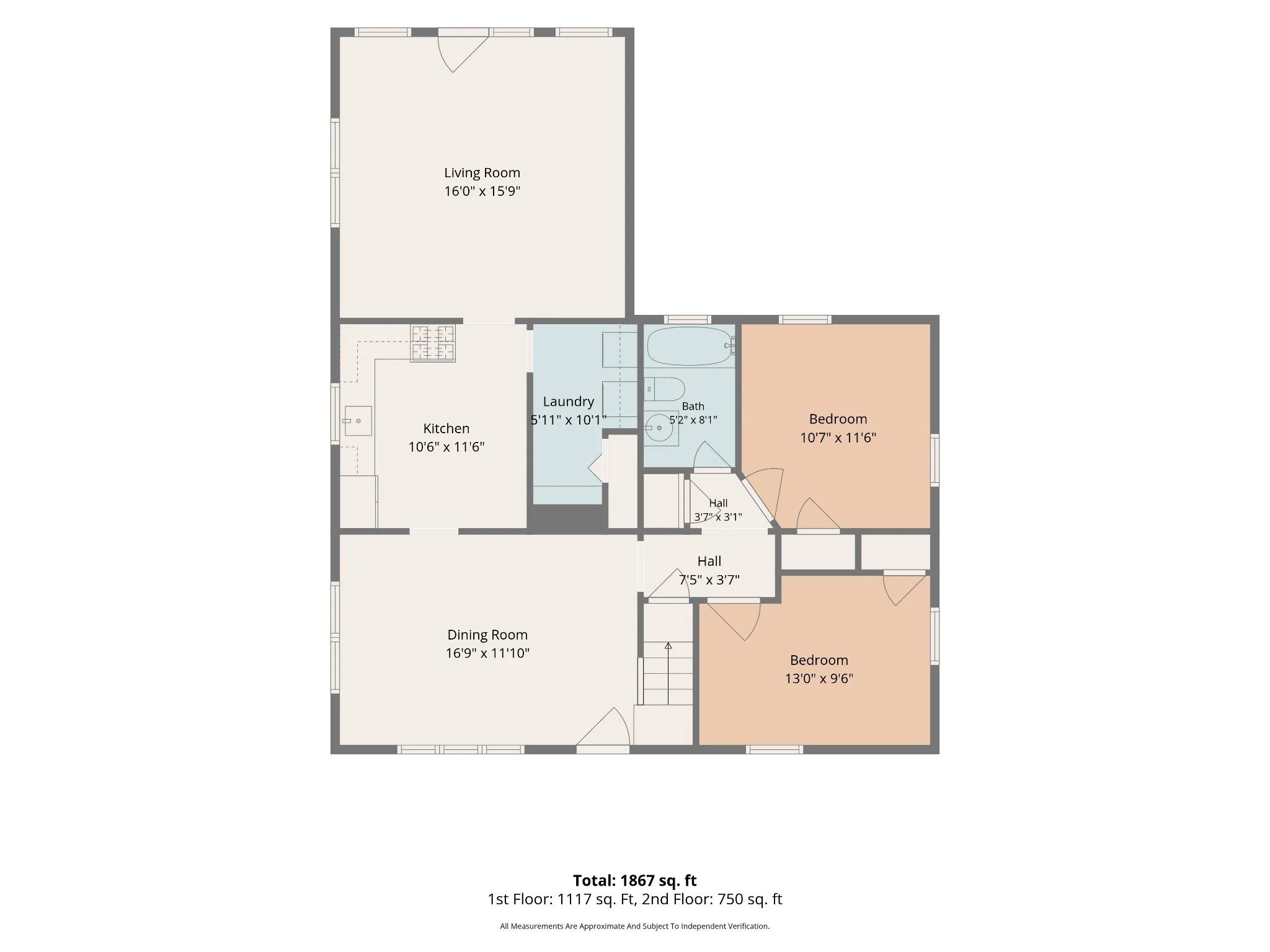
iGUIDE Premium
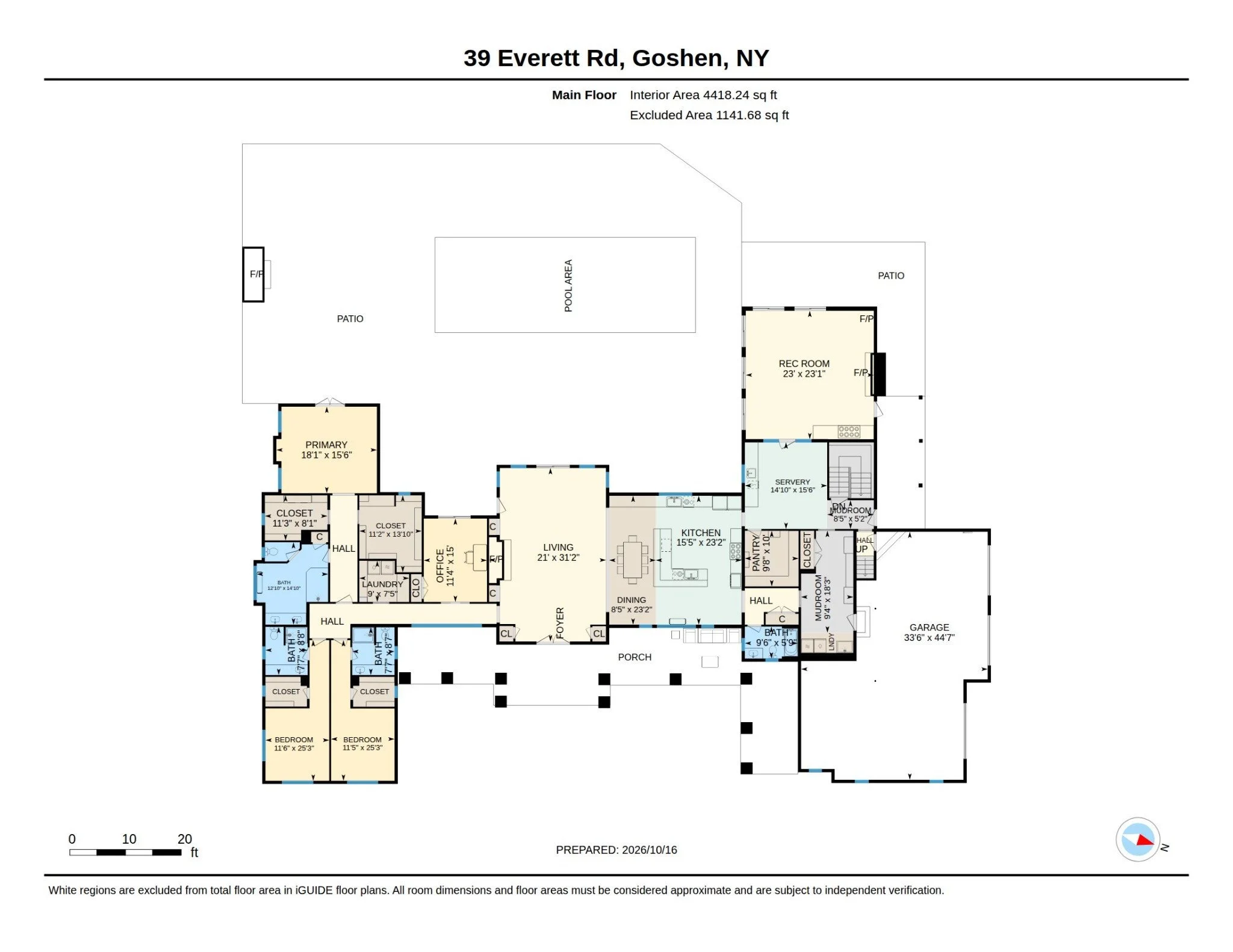
Zillow 3D Home
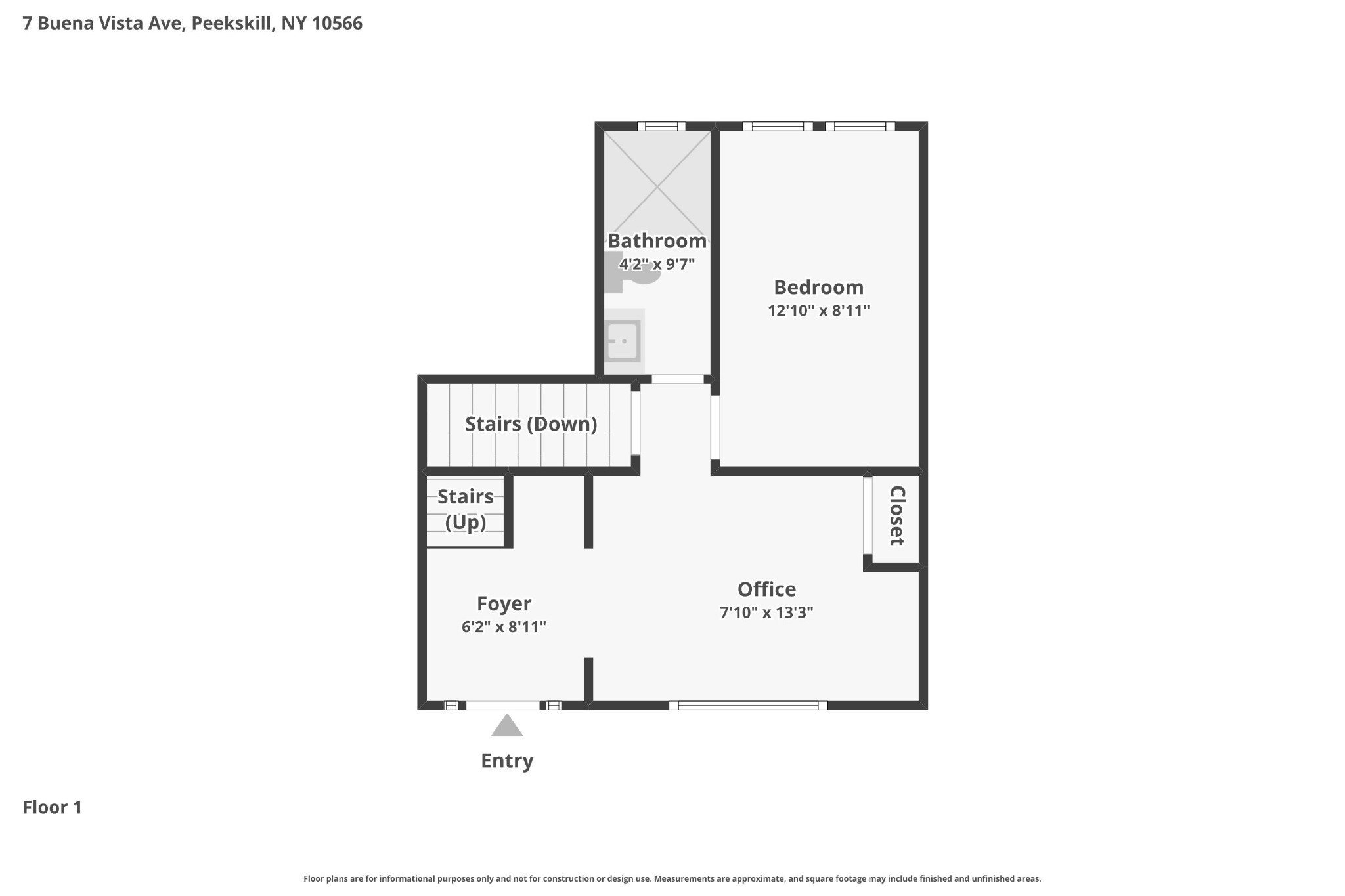
Examples from different properties, illustrating presentation and capabilities—not a controlled accuracy comparison.
Why Floor Plans Matter in Real Estate Marketing
Professional photography shows buyers what a property looks like. Floor plans help them understand how the spaces fit together.
A photograph of a beautiful kitchen may attract attention, but a floor plan helps buyers see how that kitchen connects to the dining room, living room, and other areas of the home.
Floor plans can help prospective buyers understand the overall layout, visualize room relationships, evaluate how spaces might be used, and better prepare for an in-person showing.
Depending on the technology selected, floor plans may also include room dimensions, detailed property measurements, or integration with an interactive virtual tour.
But here's something many agents and homeowners may not realize:
Not every floor plan is created using the same technology, and not every floor plan is intended to provide the same level of measurement information.
Understanding How Floor Plans Are Created: The Technology Behind the Results
One of the most important differences between modern floor plan systems isn't simply how the finished floor plan looks. It's how the information is captured and how that information is transformed into a floor plan.
Artificial intelligence plays a role in several of today's floor plan technologies. However, not all AI-generated floor plans start with the same type of information.
Some systems analyze smartphone scans or 360-degree photography to estimate a property's layout and dimensions. Others use measurements collected by specialized laser-scanning equipment.
Understanding that distinction is particularly important when comparing CubiCasa, Zillow 3D Home, and iGUIDE.
CubiCasa: Smartphone Scanning and AI-Assisted Floor Plans
CubiCasa uses a smartphone application to capture visual and spatial information while the operator walks through a property.
Rather than requiring a dedicated laser-scanning system, the operator walks through the property with a compatible smartphone using the CubiCasa application.
Its software uses machine vision and artificial intelligence to process the captured data and generate a floor plan. CubiCasa also incorporates human quality assurance into its processing workflow.
Depending on the product selected, CubiCasa can provide room labels, dimensions, area calculations, and additional floor plan details.
What Makes CubiCasa Useful?
One of CubiCasa's greatest advantages is convenience.
It provides an efficient way to create a clear, easy-to-understand floor plan that helps prospective buyers visualize the layout of a home.
For many listings, that's exactly what an agent needs.
CubiCasa is particularly useful when the primary objective is to provide an attractive, practical floor plan for property marketing.
CubiCasa also offers optional GLA floor plans and reports following ANSI Z765. Deliverables depend on the selected package and add-ons. Here, the focus is the marketing floor plan, compared with iGUIDE’s professionally drafted floor-plan and interactive-tour workflow.
iGUIDE: Advanced Floor Plans, LiDAR Measurements, and Interactive Virtual Tours
When people hear the name iGUIDE, they often think of a 3D virtual tour.
And while iGUIDE provides an interactive way to explore a property, its Standard and Premium offerings are built around something particularly valuable: detailed floor plans supported by LiDAR-based spatial measurement technology.
This is an important distinction.
Rather than thinking of iGUIDE Standard and Premium simply as virtual tours that happen to include floor plans, it is helpful to understand them as floor plan and property measurement solutions that also include an interactive virtual tour.
What Is LiDAR, and How Does It Work?
LiDAR stands for Light Detection and Ranging.
It is a technology that measures distances using laser light.
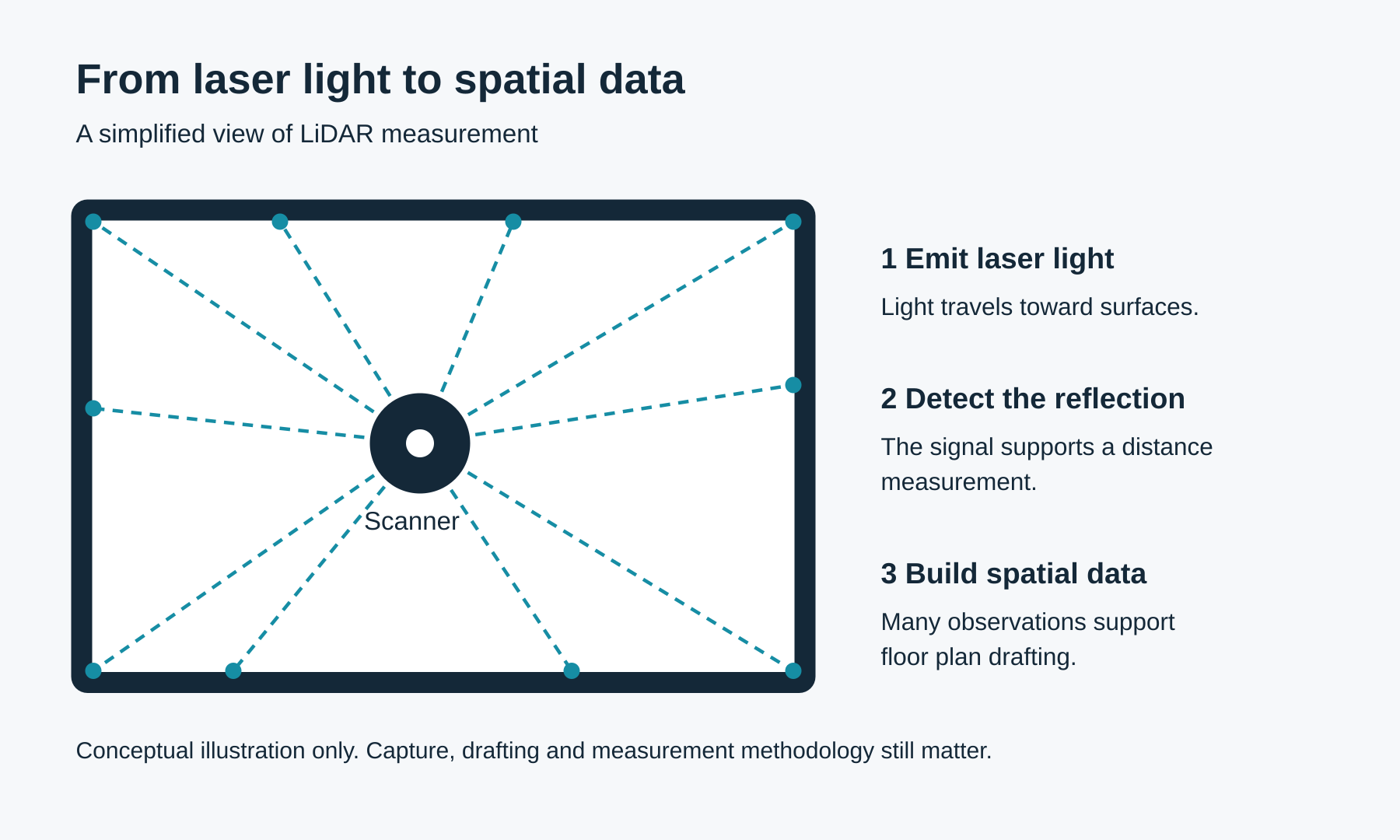
A LiDAR scanner emits laser light and analyzes the reflected signal to determine distances to surrounding surfaces.
During a property scan, the system can collect thousands of spatial measurement points in a short period.
Imagine standing in a room with a handheld laser measurer and manually measuring individual walls, openings, and other features.
Now imagine a scanning system collecting thousands of measurements throughout the surrounding space far more quickly than a person could reasonably record them individually.
That's one of the advantages of LiDAR technology.
Rather than relying solely on visual interpretation, the system captures detailed spatial data that can be used to develop floor plans and support property measurement calculations.
Of course, final measurements still depend on proper scanning, processing, drafting, and the measurement standards applied.

iGUIDE Instant, Standard, and Premium: What's the Difference?
iGUIDE Instant, Standard, and Premium use LiDAR-based capture data, but the process used to create the final floor plan differs.
iGUIDE Instant: AI-Generated Floor Plans Using LiDAR Data
iGUIDE Instant provides an interactive 3D walkthrough with an AI-generated black-and-white floor plan and room dimensions.
iGUIDE Instant uses spatial information captured by the iGUIDE LiDAR system as the basis for its AI-generated floor plan.
The artificial intelligence processes that captured data to generate the property's layout. This means that although the final floor plan is AI-generated, its underlying spatial information comes from laser-based measurements collected on location.
Instant provides an efficient way to combine LiDAR-based capture with automated floor plan generation. It does not include the same professionally drafted floor plan and measurement-reporting features as iGUIDE Standard and Premium.
It is a convenient option for agents who want a virtual tour and visual floor plan without the detailed drafted measurement reporting available with Standard and Premium.
At HomeTourVision, iGUIDE Instant is offered for properties up to 5,000 square feet, with 120 days of hosting.
iGUIDE Standard: LiDAR Data with Professional Drafting
iGUIDE Standard uses LiDAR-based capture to support professionally drafted floor plans and property measurement reporting.
It includes room dimensions, an on-screen measurement experience, property measurement reporting with ANSI Z765 support where applicable, and weekly tour analytics.
This makes it particularly useful for agents who need more detailed property information than a basic marketing floor plan provides.
iGUIDE Premium: Enhanced Professionally Drafted Floor Plans
iGUIDE Premium builds upon Standard. It uses the same LiDAR-based capture approach and professional drafting workflow while adding enhanced floor plan details such as fixtures and appliances.
These additional features provide a more comprehensive visual representation of the property's layout.
Both Standard and Premium combine measurement-focused floor plans with an interactive virtual tour.
Drafted floor plan
Interactive tour

Beyond the Floor Plan: iGUIDE's Interactive Dimensions Tool
One of the valuable features available on eligible iGUIDE Standard and Premium tours is the interactive Dimensions tool.
Accessible through the tour controls, the Dimensions layer displays room and wall measurements directly over the 360-degree imagery. Available filters can show wall, door, and window measurements, helping buyers understand the space while exploring the tour.
For example, a buyer can view an available wall or doorway measurement without relying exclusively on a printed floor plan. These overlays complement the drafted floor plan and property measurement information.
Availability depends on the capture hardware and data. The feature requires compatible PLANIX Pro or PLANIX R1 capture with height data at every viewpoint; door and window overlays require the newer draft format. Not every existing Standard or Premium tour includes every overlay.
Dimensions is separate from the custom point-to-point Measure tool. Displayed dimensions are estimates; verify critical measurements on site.
The Dimensions tool is not included with iGUIDE Instant.

Property Measurement Reports
Another important feature of iGUIDE Standard and Premium is the property measurement report.
Rather than simply displaying a floor plan, these products provide documented property measurement information prepared using the applicable measurement methodology.
This can be particularly valuable when agents need to understand how the reported square footage was calculated.
However, a measurement report should always be interpreted according to the standard used and should not be confused with a legal survey or appraisal.

Zillow 3D Home: An Interactive Virtual Tour Experience
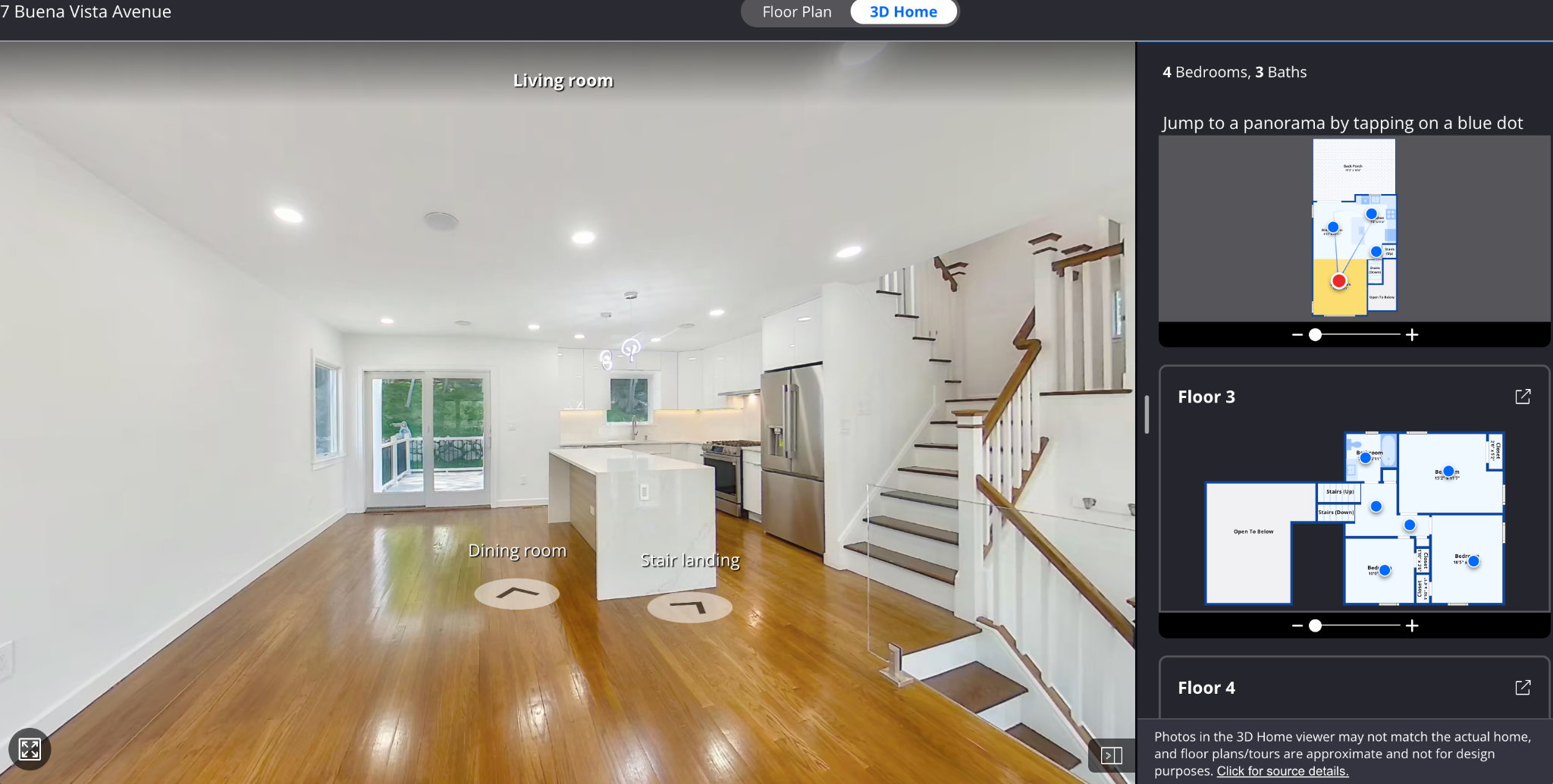
Zillow 3D Home uses 360-degree panoramic imagery captured with compatible cameras to create an interactive virtual tour and accompanying floor plan.
Zillow uses computer vision and machine learning technology to analyze the images, identify spatial relationships, and estimate room dimensions and square footage.
Its primary purpose is to allow prospective buyers to virtually explore a property through connected 360-degree imagery.
Buyers can navigate between rooms and gain a better understanding of the home's interior without physically visiting the property.
This allows buyers to navigate the property virtually while referencing the floor plan.
Because the floor plan is generated from visual information and computational estimates, its dimensions should be understood as approximate rather than as a substitute for a dedicated property measurement report.
How Does Zillow Showcase Fit In?
Zillow Showcase is a separate premium listing-marketing product offered through Zillow.
A Zillow 3D Home tour with floor plans is part of the required media experience for Showcase listings.
However, Zillow 3D Home and Zillow Showcase are not the same product.
HomeTourVision can provide Zillow 3D Home media for eligible Showcase listings, while Showcase participation and activation are managed separately through Zillow.
It's also important to understand that Zillow's floor plan serves a different purpose from the detailed measurement reports available with iGUIDE Standard and Premium.
A Zillow floor plan is useful for visualizing a property's layout and supporting the virtual tour experience, but it should not automatically be treated as equivalent to a LiDAR-based property measurement report.
Floor plan
Interactive tour
Three Technologies, Three Different Approaches
Although CubiCasa, iGUIDE, and Zillow 3D Home can all provide floor plans, they are designed around different priorities.
CubiCasa uses smartphone-captured visual and spatial data, combined with automated processing and human quality checks, to create a convenient, visually useful floor plan.
iGUIDE Standard and Premium emphasize detailed floor plans, LiDAR-based spatial measurement, and property measurement reporting, while also providing interactive virtual tours.
Zillow 3D Home uses panoramic imagery and AI-based analysis to construct its interactive floor plan and estimate dimensions, supporting the virtual tour and Zillow listing experience.
iGUIDE uses LiDAR-based spatial measurements captured on location. With Instant, those measurements support an AI-generated floor plan. With Standard and Premium, they support professionally drafted floor plans and more detailed measurement reporting.
The key difference isn't simply whether artificial intelligence is involved. It's the type of information the system starts with and how that information is processed.
None of these approaches should be judged solely by how attractive the resulting floor plan looks.
The more important question is what information the floor plan provides and how that information will be used.
Why Do Floor Plan Measurements Sometimes Differ?
This is one of the most important things real estate agents should understand.
Two floor plans of the exact same property can produce different measurements, even when both were created using legitimate methods.
That doesn't automatically mean one is wrong.
Differences may result from the technology used, how the property was measured, the measurement standard applied, or which areas were included in the calculations.
Can You Trust the Square Footage in Tax Records?
Many agents and homeowners assume that the square footage appearing in municipal or county property records must be correct.
After all, it's an official record.
But a square footage figure in public records doesn't necessarily mean someone recently visited the property and physically measured every space.
Depending on the jurisdiction and the property's history, the figure may have originated from original construction documents, previous assessment records, earlier measurements, or other sources.
That raises several important questions:
- When was the property last physically measured?
- What measurement method was used?
- Were measurements based on interior or exterior dimensions?
- Were exterior wall thicknesses included?
- Were additions or renovations incorporated into the records?
- Were garages, basements, porches, or other areas included or excluded?
- Was the figure based on a physical measurement, original plans, or an estimate?
Even builder plans can differ from the completed property.
Changes during construction, different measurement conventions, and differences between advertised and measured square footage can all contribute to discrepancies.
None of this means public records or builder plans are always incorrect.
It simply means that a square footage figure should be understood in the context of how it was obtained.
Interior Measurements vs. Exterior Measurements
Consider a simple example.
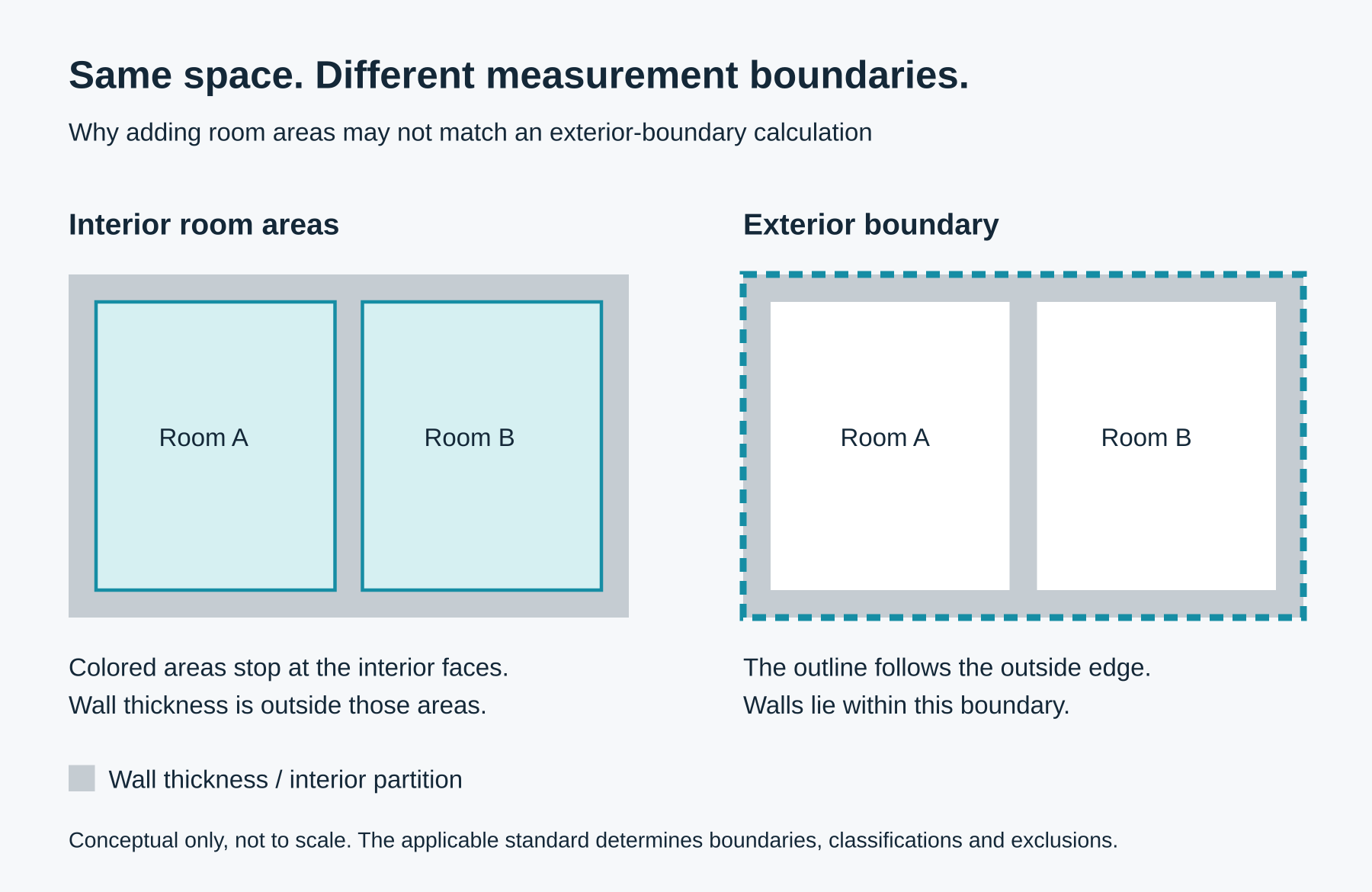
If you measure the interior dimensions of every room and add them together, you may arrive at a different total than if you calculate the property's area using exterior boundaries.
That's because wall thicknesses, interior partitions, and the applicable measurement standard can affect the result.
Certain areas, including garages, basements, and enclosed porches, may also be classified differently depending on the measurement standard.
This is one reason the square footage appearing on a floor plan may differ from public records or a previous listing.
Why Measurement Technology Matters
Marketing-oriented floor plans are useful for helping buyers understand the layout of a property.
But when detailed measurements are important, the method used to capture the property becomes especially relevant.
LiDAR-based systems such as iGUIDE Standard and Premium provide detailed spatial measurement data that supports drafted floor plans and property measurement reporting.
This creates a more measurement-focused workflow than a basic visual floor plan.
However, no technology should be assumed to produce an infallible result.
Capture quality, drafting methods, classification decisions, and measurement standards all play a role.
For real estate professionals, the key is understanding what each floor plan represents and choosing the appropriate solution for the intended purpose.
Floor Plan and Tour Options at a Glance
The selected package matters as much as the platform name. This is a practical comparison of the workflows discussed above, not a ranking of measurement accuracy.
| Technology | Floor Plan | Interactive Tour | Measurement Features |
|---|---|---|---|
| CubiCasa | Smartphone-generated 2D floor plan | Not included with the standard floor plan product | Dimensions and area information depending on the product; optional ANSI Z765 GLA plans and reports |
| iGUIDE Instant | AI-generated black-and-white floor plan using LiDAR capture data | Yes | Basic floor plan information and room dimensions; not the Standard/Premium drafted reporting workflow; no Dimensions tool |
| iGUIDE Standard | LiDAR-based drafted floor plan | Yes | Room dimensions, Dimensions tool on eligible tours, and property measurement report; ANSI Z765 support where applicable |
| iGUIDE Premium | Enhanced drafted floor plan with fixtures and appliances | Yes | Standard measurement features plus enhanced floor plan details; Dimensions eligibility requirements still apply |
| Zillow 3D Home | AI-generated floor plan from 360-degree imagery, supporting the virtual tour | Yes | Layout and available floor plan information, including approximate dimensions |
Dimensions availability depends on compatible capture hardware and data; door and window overlays require the newer draft format. Enhanced visual detail does not itself mean higher measurement accuracy. Verify critical dimensions on site.
Zillow Showcase is a separate listing-marketing product; it is not another name for Zillow 3D Home. Features and eligibility depend on the selected product and current provider requirements.
Which Floor Plan Solution Is Right for Your Listing?
There isn't one answer that applies to every property.
If the goal is to provide buyers with a clear, attractive representation of the home's layout, CubiCasa may be an excellent choice.
If the priority is an interactive virtual tour integrated into Zillow's listing ecosystem, Zillow 3D Home may be the right option.
If an agent wants an interactive walkthrough with an AI-generated floor plan based on LiDAR capture data, iGUIDE Instant offers another solution.
And when detailed drafted floor plans, room dimensions, and property measurement reporting are important, iGUIDE Standard or Premium provides a more comprehensive measurement-focused experience.
The right choice depends on the property, the marketing strategy, and the information agents want to provide prospective buyers.
The Bottom Line: Understanding the Technology Matters
Floor plans have become an important part of modern real estate marketing.
They help buyers understand properties, visualize layouts, and make more informed decisions before scheduling a showing.
But not every floor plan is created the same way.
Some are designed primarily for visual marketing. Others are integrated into interactive virtual tours. And some use advanced LiDAR measurement technology to produce more detailed property information.
Understanding these differences helps real estate professionals choose the right technology for each listing.
At HomeTourVision, our goal is not simply to provide floor plans and virtual tours. It's to help agents understand the technology behind these tools so they can make informed decisions about how they showcase their properties.
Because effective property marketing isn't just about showing how a home looks.
It's about helping buyers understand the space.